
By Rissa Prima, Digital Marketing Manager, Cabo Bali · Updated 25 June 2026 · 7 min read
How to Get Your Bali Villa Verified on Google Maps
(And What to Do When It Won't Verify)
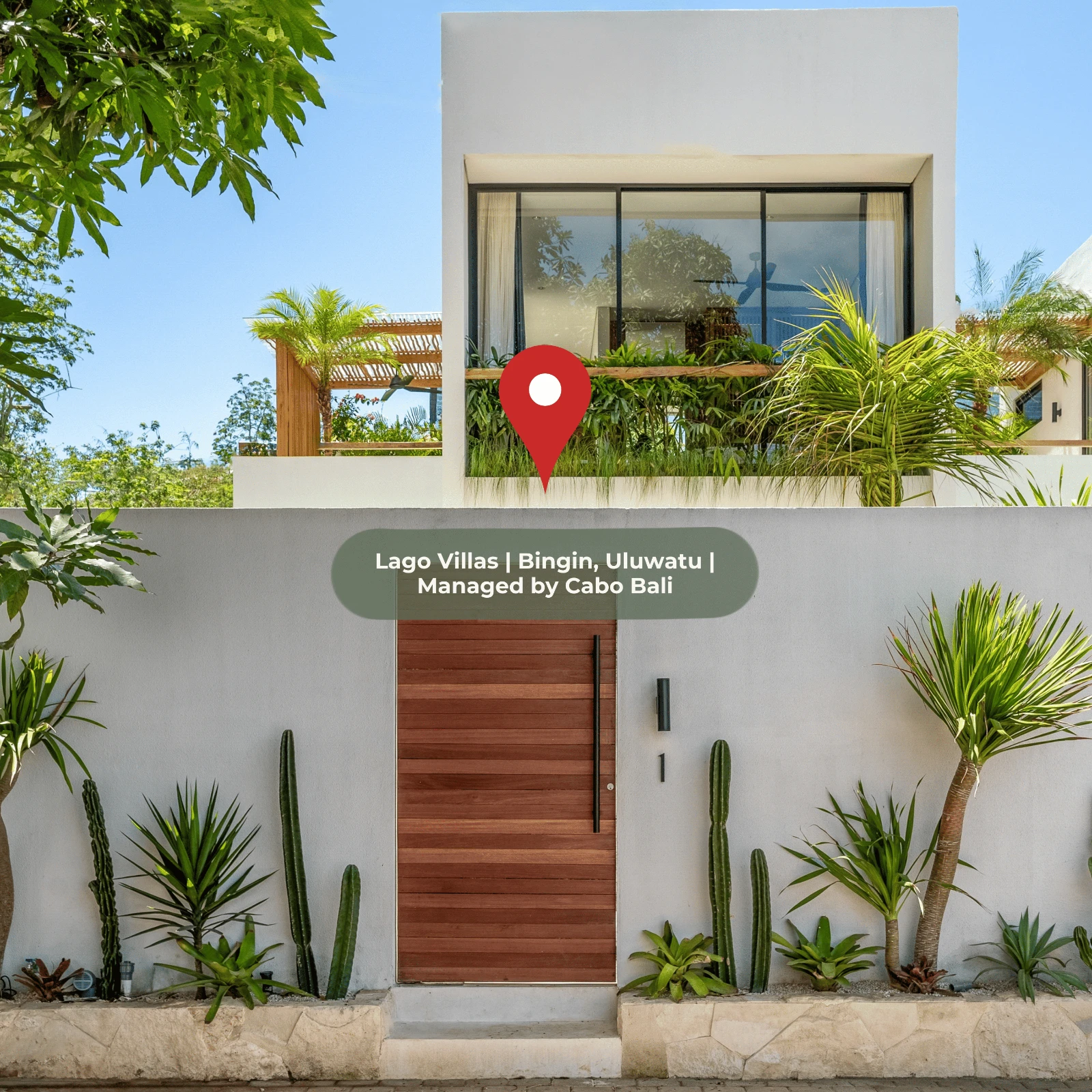
If you own a villa in Bali and you're not on Google Maps, you're invisible to every traveller who searches "villas in Bingin" or "private pool villa Uluwatu" before they open Airbnb.
Getting verified should be simple. In Bali — where addresses are inconsistent and postcodes don't exist — it isn't. This guide covers exactly how to do it, and what to do when Google keeps saying no.
The short answer: A Google Business Profile (GBP) is the free Google listing that puts your Bali villa on Google Maps and in local Search. To get a Bali villa verified, set it up under the "Vacation Home Rental" category and request a verification video — the postcard method Google uses elsewhere doesn't work reliably in Bali.
Quick answer — getting a Bali villa on Google Maps:
- Use "Vacation Home Rental" or "Villa" as the category — never "Hotel" (it triggers stricter verification).
- Skip the postcard; request a video walkthrough to verify.
- In dense lanes (Bingin, Uluwatu), verify with the pin on a nearby open field, then move it back to your villa.
- Set your own domain as the website, not an OTA link, so the backlink value stays with you.
- To fill the "Book" section, list on Booking.com, Expedia or Traveloka — Airbnb doesn't appear there.
- Turn on edit notifications and audit monthly to stop competitors hijacking your listing.
| Stage | What to do | Typical time |
|---|---|---|
| Choose category | "Vacation Home Rental" or "Villa" — never "Hotel" | ~5 min |
| Set address + pin | Use the nearest landmark, then drag the pin to the exact spot | ~5 min |
| Verify | Request a video walkthrough (skip the postcard) | 1–3 days |
| Protect | Turn on edit notifications; audit the listing monthly | ~10 min/mo |
| Connect bookings | List on Booking.com / Expedia / Traveloka to fill the "Book" section | passive |
On this page
- Does Google Maps Actually Drive Bookings for Bali Villas?
- Quick Diagnostic: Where Are You Starting From?
- Step 1: How to Set Up a Google Business Profile for a Bali Villa
- Step 2: Why Google Business Profile Verification Fails in Bali (And How to…
- Step 3: How to Stop Competitors from Hijacking Your Google Business Profile
- Step 4: How to Get Your OTA Booking Links Appearing on Google Maps
- The Most Common Google Business Profile Mistakes Bali Villa Owners Make
- What We've Learned Managing GBPs Across a Bali Villa Portfolio
- Frequently Asked Questions
- Managing This Yourself vs. Having It Done For You
- Part of the Cabo Bali Direct Bookings Guide Series
- Sources & References
Does Google Maps Actually Drive Bookings for Bali Villas?
Before getting into the how, it's worth grounding this in what actually happens.
Google's local ranking algorithm for accommodation weighs three factors: relevance (does your listing match what the searcher wants), distance (how close is the property to the search), and prominence (how established and trusted is the business). A villa with zero Google reviews will rank below a villa with ten reviews in nearly every local search — regardless of how well the rest of the profile is set up.
Google Maps is a direct booking opportunity, not just a discovery tool. A large share of villa searches start on Google Maps directly — not through OTAs. A verified profile with a link to your own booking page means you can capture that traffic without paying commission. The best villa management companies build this into their setup from day one: a collection page where guests can browse properties and book direct, with OTA links as a fallback rather than the default. See an example of how Cabo Bali structures this →
The repeat booking problem. When a guest who has previously stayed wants to rebook, a Google search is often their first move. Without a verified GBP, that repeat booking routes back through Airbnb and you pay commission again. Across a portfolio of properties over a year, unverified listings cost real money — and it's money that requires no additional marketing spend to recover.
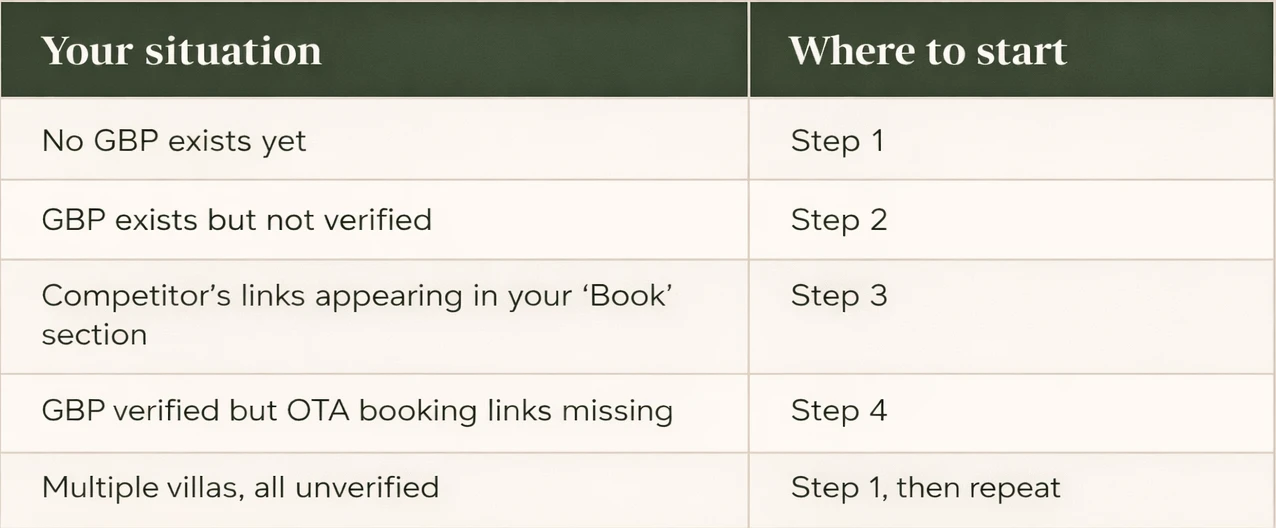
Quick Diagnostic: Where Are You Starting From?
Before following any steps, check your current status:
Step 1: How to Set Up a Google Business Profile for a Bali Villa
Most verification failures happen because the profile was setup in the wrong category or with incomplete information. This is the most common mistake with self-managed villas — and the one that causes the most downstream problems.
Choose the right business category
For individual villas, use "Vacation Home Rental" or "Villa" as your primary category. Do not use "Hotel" or "Resort" — Google applies stricter verification processes to those categories. Add secondary categories like "Swimming pool" or "Holiday apartment" if relevant.
Use a real, locatable address
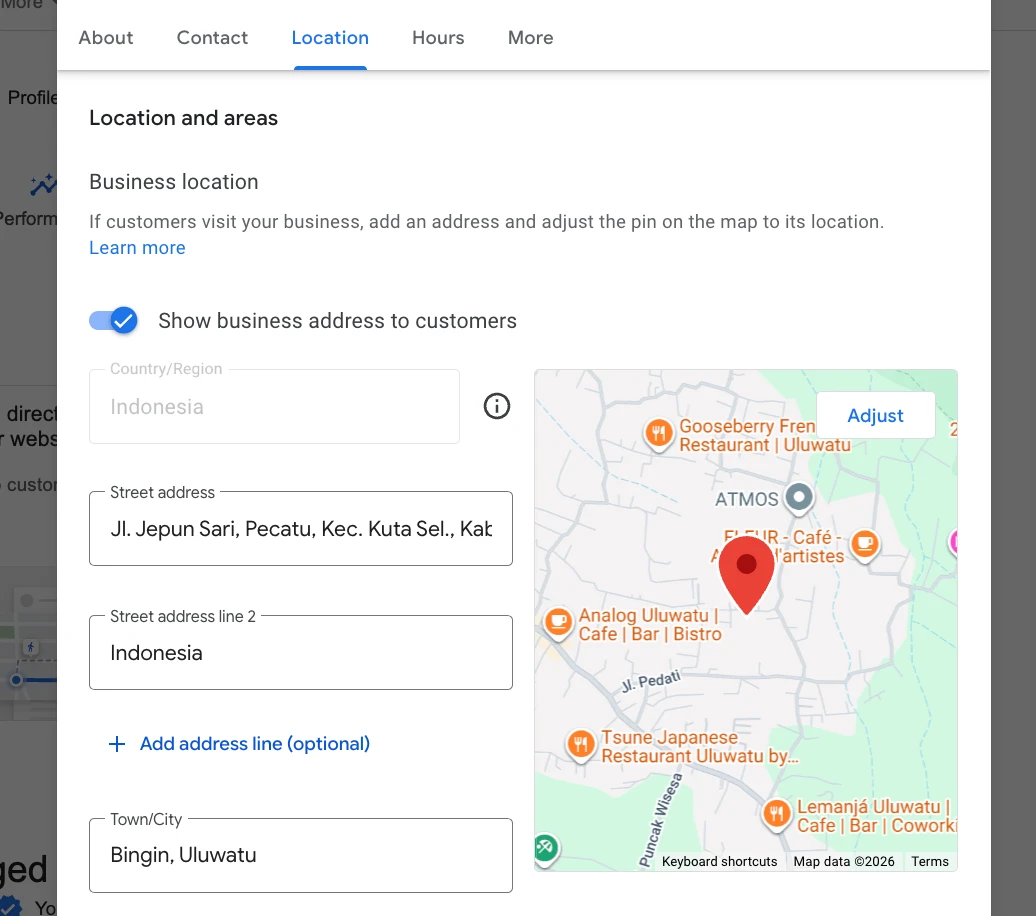
If your villa doesn't have a street address that Google Maps can geocode, use the address of the nearest compound entrance or landmark, then manually adjust the map pin to your exact property location. Google allows this. The pin placement matters more than the text address for map ranking.
Use a local Indonesian phone number
International numbers create verification friction. If you manage remotely, use a local SIM or a WhatsApp Business number with an Indonesian prefix (+62) — or let your manager handle it as part of running the villa.
Add your website — but point it to the right place
If you have your own domain, use that. The GBP website link is a valuable backlink and sending it to a third-party platform means that authority flows to someone else. That said, if you don't have your own domain yet, a link to your OTA listing is better than leaving the field blank. When you do have a direct booking page — or a villa collection page like this one — update it. This is where guests can browse and book directly, rather than bouncing back to an OTA.
Estimated time: 20–30 minutes per property.
Step 2: Why Google Business Profile Verification Fails in Bali (And How to Fix It)
Google offers several verification methods. In Bali, only one of them reliably works.
Forget the postcard — request a verification video instead
Standard GBP verification elsewhere involves Google sending a postcard with a PIN. In Bali, this isn't a realistic option — mail delivery is too unreliable and the PIN expires quickly. Go straight to requesting a verification video via your GBP dashboard.
How to pass the verification video
After setting up your profile, select "Get verified" and choose the video option. You'll be asked to record a short walkthrough of your property. Have your villa name visible somewhere — a branded welcome sign or door plaque works — and show the pool, the entrance, and a check-in folder with your management company branding. Five minutes of preparation is usually enough.
PRO TIP — Dense villa areas like Bingin and Uluwatu: Google's reviewers sometimes reject the video because there's no visible signage distinguishing your villa from neighbouring properties. Where five villas share a lane and look identical from the street, this is genuinely hard to satisfy. The work around: before submitting your verification video, temporarily move your map pin to a nearby open field rather than placing it directly on your building. Get verified there. Once your profile is approved and live, move the pin back to your exact villa location — Google allows pin adjustments on verified profiles without triggering re-verification. The reason this works: Google's concern during video verification isn't precise pin placement, it's confirming you're not attempting to claim another business's location. An open field has no competing claim.
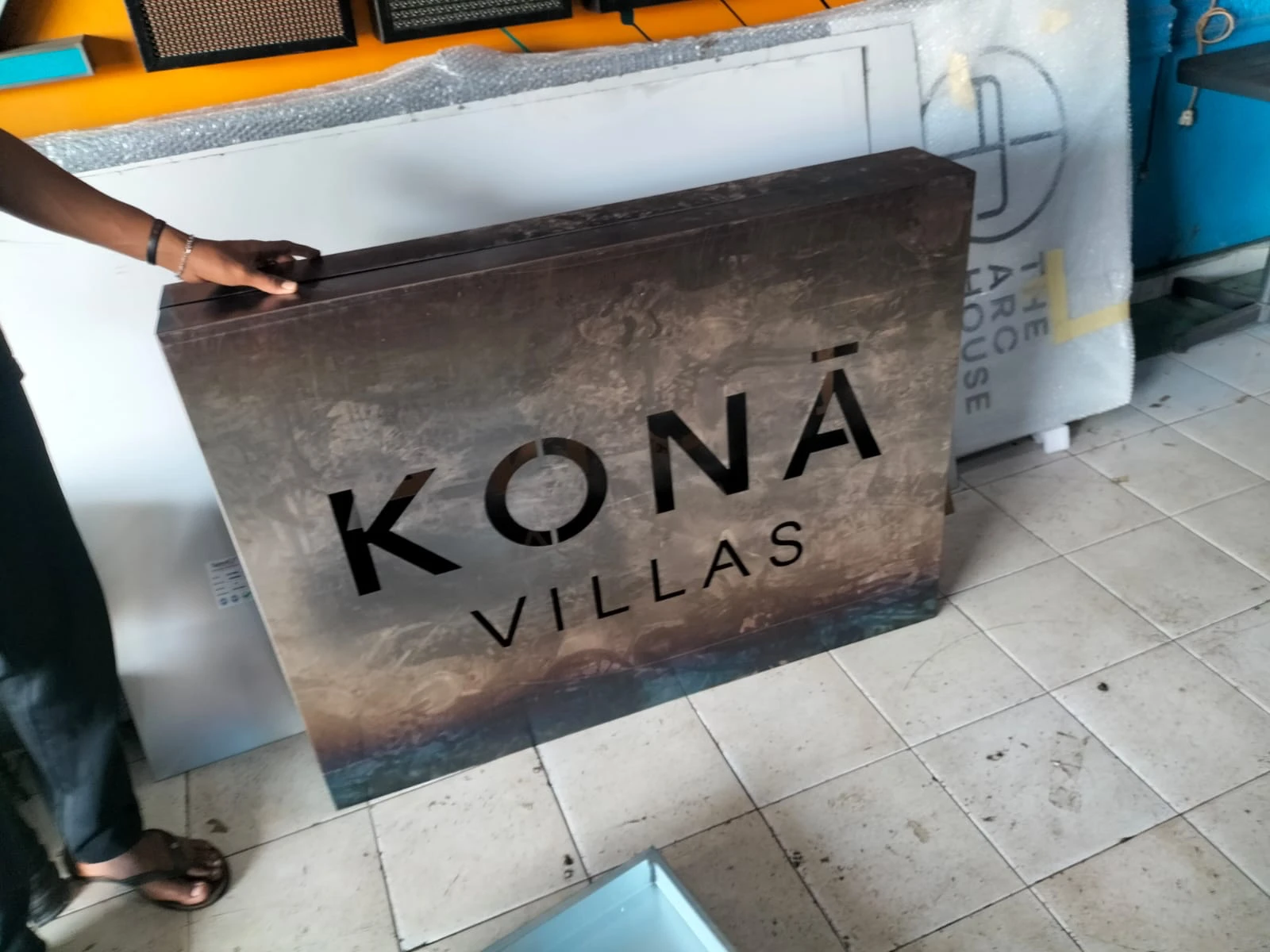
Need a villa sign made? We've put together a guide to getting villa signage right in Bali, including recommended vendors. Read the villa signage guide →
Google flags your listing as a duplicate
If someone has previously created a listing for your villa — even informally — Google will block your new profile. Guests sometimes add properties to Maps after a stay.
What to do: Search Google Maps for your villa name before creating anything. If an unverified listing already exists, request ownership via the "Claim this business" button rather than creating a competing profile.
Google classifies your villa as a service area business
This removes the pin from Maps entirely. It happens when Google's systems detect a residential address used for a business listing.
What to do: Don't hide your address. Select "I serve customers at my business address" and confirm your accommodation category. Your verification video — showing a physical operating location — should resolve the classification.
Estimated time: 1–3 days for video submission and review.
Step 3: How to Stop Competitors from Hijacking Your Google Business Profile
Once verified, your listing isn't automatically safe. Google Maps has a "Suggest an edit" feature that anyone can use — including competitors. It's more common in the Bali villa market than most owners realise.
We've encountered this directly. A competitor with a similar villa name was operating in our area. Because the names were close enough to confuse Google's systems, their OTA booking links started appearing in the "Book" section of our villa's GBP — meaning guests searching for us were being sent to a competitor's listing.
Enable GBP notifications. Settings → Notifications. You'll be emailed every time a change is suggested or applied.
Audit your listing monthly: website link, phone number, business name, and booking links.
Revert unauthorised changes immediately via the GBP dashboard. If they reappear, file a report via the Google Business Profile Redressal Form — this is a formal abuse escalation, not a standard support ticket.
Competitor OTA links in your 'Book' section indicate a CID (Customer ID) matching error. Contact Google Support directly — not the standard help form — and ask them to manually review the booking link integration for your property CID.
Estimated time: 10 minutes monthly to audit. Abuse resolution: 2–4 weeks.
Step 4: How to Get Your OTA Booking Links Appearing on Google Maps
The "Book" section of your GBP pulls booking options from connected OTAs. Getting these to show correctly requires your profile to be properly matched to the right platforms — and being on the right OTAs in the first place.
Which OTAs appear on Google Maps?
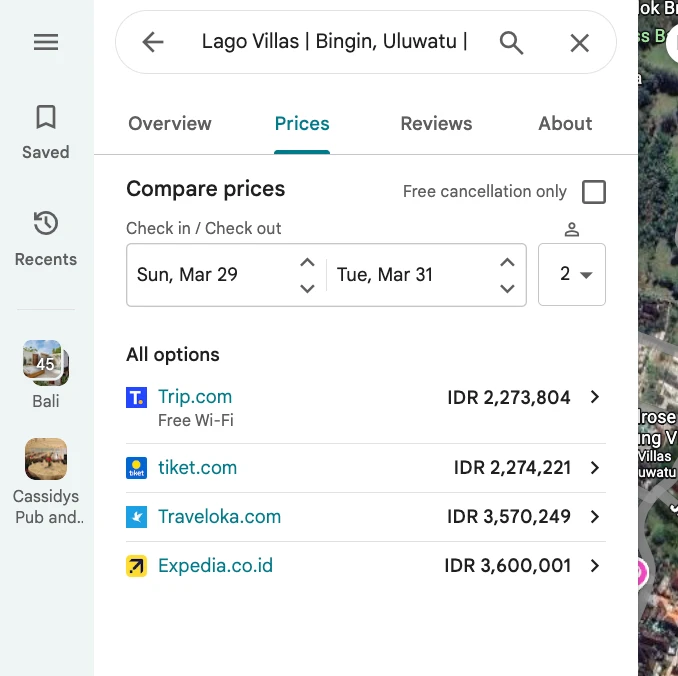
Not all OTAs are equal here. Airbnb does not advertise in the Google Maps booking links section. The OTAs that do appear — and that you should be on if you want this section to work — are:
• Booking.com (participates in Google's Hotel Center; pushes listings automatically for accommodation properties)
• Expedia
• Trip.com
• Traveloka
• Tiket.com
Being on the right OTAs, with those listings properly geocoded and named, is what determines whether the booking links section of your GBP works at all. It pays to get the OTA setup right from the start.
Matching your listings correctly
For Booking.com: Pushes to Google's Hotel Center automatically if your property is categorised as accommodation. Ensure the address geocodes to the same location as your GBP pin.
For Expedia, Traveloka, Tiket, and Trip.com: The property name and address on each platform must match your GBP exactly. Slight variations — abbreviated names, old addresses, inconsistent formatting — will break the link.
Address geocoding errors compound. If your GBP pin is placed even 200 metres from your actual villa, your OTA listings may not match correctly and the booking links silently fail. We found this on multiple properties in the portfolio after auditing CID mismatches.
If links still aren't appearing after a few weeks: contact Google via the Business Profile support chat and ask them to manually review the booking link integration for your specific property CID.
Estimated time: Passive if setup is correct. Manual fix: 1–2 weeks.
The Most Common Google Business Profile Mistakes Bali Villa Owners Make
Using "Hotel" as the business category. Triggers a verification tier designed for properties with on-site reception. Use "Vacation Home Rental" instead.
Linking the GBP to a PMS subdomain. Better than nothing, but your own domain is always the right call if you have one.
Creating a new listing instead of claiming an existing one. If a listing already exists for your villa, creating a duplicate triggers Google's spam detection. Always check first.
Hiding the address when prompted. This removes your pin from Maps entirely. Villas are not service area businesses — contest the classification.
Being Airbnb-only and expecting booking links to appear. Airbnb doesn't participate in Google's booking links section. Without Booking.com, Traveloka, or similar OTAs, your 'Book' section will be empty.
Not monitoring for suggest-an-edit abuse. This tends to go unnoticed for months.
What We've Learned Managing GBPs Across a Bali Villa Portfolio
The verification video is the only reliable method. Don't wait for anything to arrive in the post. Request the video option directly and have your property ready to show.
Reviews matter more than photos. The ranking algorithm cares more about review count and recency than profile aesthetics. A plain profile with 15 reviews will outrank a beautifully photographed one with zero.
Direct booking links on your GBP are the real prize. Getting verified is step one. The bigger opportunity is what happens after — routing Google Maps traffic to your own booking page, not back to an OTA. Every direct booking through your GBP saves you the full commission.
Consistency across all platforms beats optimisation on any single one. Same name format, same phone number, same address — across GBP, Booking.com, Traveloka, your website, and any directories. This is what builds the entity signal Google needs to trust your listings.
Key takeaways
- A verified Google Business Profile puts your villa on Google Maps before guests open an OTA — and lets past guests rebook direct, commission-free.
- The video walkthrough is the only verification method that works reliably in Bali. Don't wait for a postcard.
- Category matters: use "Vacation Home Rental", never "Hotel".
- The "Book" section only fills if you're on Booking.com, Expedia or Traveloka — Airbnb doesn't feed it.
- Maintenance is ongoing: watch for suggest-an-edit abuse and keep your name, phone and address identical everywhere.
Frequently Asked Questions
Can a Bali villa get verified on Google Maps?
Yes. The most reliable method for Bali villas is to submit a verification video via your GBP dashboard. Request this option directly after setting up your profile — don't wait for alternative methods that won't work reliably in Bali.
What business category should I use for my Bali villa on Google?
Use "Vacation Home Rental" or "Villa" as your primary category. Avoid "Hotel" or "Resort" — these trigger a more complex verification process designed for properties with on-site reception, and they're rarely accurate for private villas.
Why is my Google Business Profile showing a competitor's booking links?
This is a CID (Customer ID) matching error. It usually happens when your villa's name or address is similar to a nearby competitor's listing. Contact Google Support directly — not the standard help form — and ask them to manually review the booking link integration for your property CID.
Why aren't any booking links showing in my GBP 'Book' section?
The most likely reason is that you're only on Airbnb, which doesn't participate in Google's booking links. To have links appear, you need to be on Booking.com, Expedia, Traveloka, Tiket, or Trip.com, with those listings correctly geocoded and named to match your GBP.
Do I need a Google Business Profile if I'm already on Airbnb and Booking.com?
Yes — for two reasons. First, guests who have stayed before often search Google directly to rebook. Without a verified GBP, that search sends them back to an OTA and you pay commission again. Second, a verified GBP makes your villa visible in Google Maps searches before a guest opens any OTA — and if you have a direct booking page (like this one), you capture that traffic and keep the full booking value.
Managing This Yourself vs. Having It Done For You
Setting up and maintaining GBPs across multiple villas is time-consuming. Keeping them accurate, protected from abuse, and properly connected to OTA booking links requires ongoing attention — not a one-time setup.
If you're managing your own villa, the three changes that make the biggest difference: select the right business category, submit a verification video instead of waiting, and build a direct booking page so your GBP traffic doesn't route straight back to an OTA.
If you'd rather have it handled: at Cabo Bali, GBP creation, verification, and maintenance is part of our standard management service. Every property we onboard gets a verified listing with booking links connected to all active OTAs — and a direct booking page guests can actually use.
Villa owners: looking for professional management across Uluwatu, Bingin, or Canggu — and want your direct booking infrastructure built properly from day one — get in touch with the Cabo Bali team.
Part of the Cabo Bali Direct Bookings Guide Series
This article is one part of our complete guide to reducing OTA dependency and building a direct booking channel for Bali villas. Related guides:
• Hub: The Complete Guide to Direct Bookings for Bali Villas — start here for the full framework
• How to Rank Your Villa Higher on Airbnb Search — once your GBP is live, focus here next
• Why Your Bali Villa's Booking.com ADR Is Lower Than Airbnb (And How to Fix It)
• Uluwatu vs Canggu: Which Area Gets Higher Villa Occupancy?
• How to Get Villa Signage Right in Bali — recommended vendors and what to include
Sources & References
This guide draws on Google's official Business Profile documentation, the OTA partner programs that feed Google's booking links, and Bali short-term-rental market data:
- Google Business Profile Help — Verify your business
- Google Business Profile Help — Choose your business category
- Google Business Profile Help — Service-area businesses
- Google Business Profile Help — Improve your local ranking on Google
- Google Business Profile — Redressal Complaint Form (abuse escalation)
- Google Maps Help — Edit or report a place ("Suggest an edit")
- Google Search Central — Local Business structured data
- Booking.com Partner Hub — connectivity & Google integration
- Expedia Group — Partner Solutions
- Traveloka — Southeast Asia OTA
- AirDNA — Bali short-term rental market data
Cabo Bali manages 20+ boutique villas across Uluwatu, Bingin and Canggu and sets up a verified Google Business Profile — with booking links connected to every active OTA — for each property at onboarding.
About the author. Rissa Prima is Digital Marketing Manager at Cabo Bali, which manages boutique villas across Uluwatu, Bingin and Canggu. Rissa writes from the operator's side of Bali villas — real numbers, real guest feedback, and lessons from the team running the portfolio day to day.